Fat Cat Card: Why a USDT Card Vanishes From Google Wallet
Short answer: Google can remove a card from Google Wallet as a security precaution if you turned off your screen lock, did not open Wallet for 90 days, factory reset the phone, cleared Google Play services data, removed your Google account, or use Dual apps. Your card account is a separate thing. Check the card app, then re-add the card with Add to Wallet.
Educational content, not financial advice. Wallet behavior comes from Google’s help page as read on November 14, 2026 and can change.
You open the checkout screen, hold your phone to the reader, and nothing. The card is gone from Google Wallet. It worked last month.
It is a bad moment, and a common one for virtual crypto cards that live mostly in an app. This page lists the six reasons Google itself gives, works out when the 90-day one will hit you, and walks through putting the card back.
Jump to a Section
- Why did my card disappear from Google Wallet?
- When will the 90-day rule remove my card?
- Is my USDT balance still safe?
- How do you add the card back to Google Wallet?
- What do the error messages mean?
Why did my card disappear from Google Wallet?
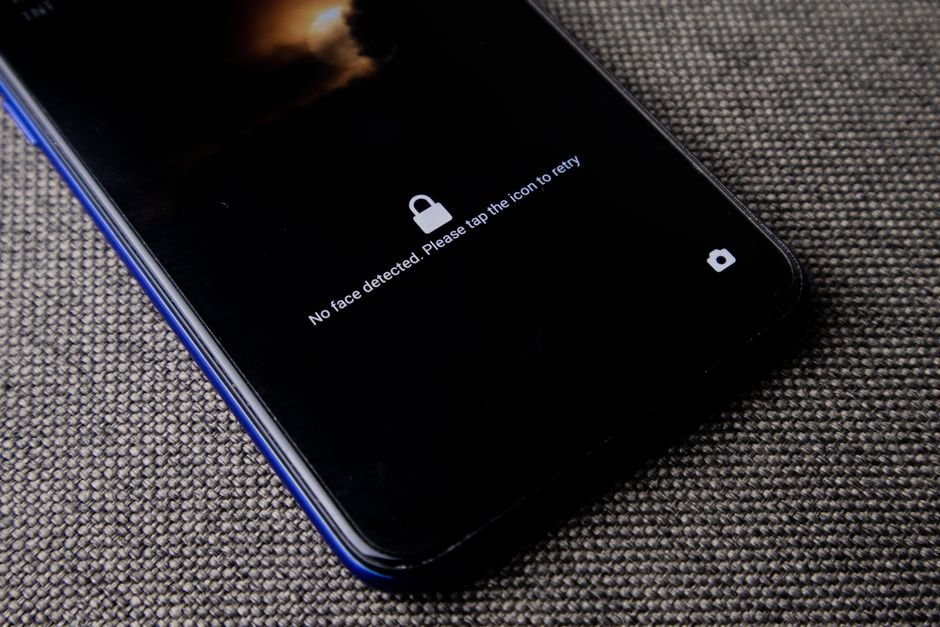
Google Wallet can remove payment cards as a security precaution when the screen lock is turned off or switched to an unsupported type, when Wallet has not been opened for 90 days or more, or when the device or account is reset, according to Google’s help page on adding cards.
| What happened | Why Google removes the card | What to do first |
|---|---|---|
| Screen lock turned off, or switched to Smart Unlock or Knock to Unlock | Wallet needs a supported screen lock | Set a PIN, pattern, password or fingerprint, then re-add |
| Wallet not opened in 90 days or more | Inactivity security rule | Open Wallet monthly; re-add now |
| Factory reset, remote wipe or device lock | Wallet data is cleared | Re-add every card |
| Cleared data for Google Play services or Google Wallet | Wallet data is cleared | Re-add every card |
| Removed your Google account from the phone | Cards are tied to the account | Sign back in, then re-add |
| Using Dual apps | Wallet data conflicts | Turn off Dual apps in Settings under Apps, delete dual app data, restart |
When I checked Google’s page, I found that it lists exactly these six triggers and no others. If none of them fits your phone, the card may never have been fully set up for tap to pay in the first place.
Fat Cat Card’s page says its virtual card can be added to Apple Pay or Google Pay and describes a USDT card on the VISA network. The wallet rules above come from Google, not from the card.
When will the 90-day rule remove my card?
A card in Google Wallet can be removed 90 days after the last time you opened the Wallet app, so a phone last opened on September 20, 2026 reaches that limit around December 19, 2026.
Here is a lookup from five possible last-opened dates, counted from today, November 14, 2026. The math is the date plus 90 days.
| Last time you opened Wallet | Day 90 | From Nov 14, 2026 |
|---|---|---|
| Aug 10, 2026 | Nov 08, 2026 | Already past 90 days |
| Aug 31, 2026 | Nov 29, 2026 | 15 days left |
| Sep 20, 2026 | Dec 19, 2026 | 35 days left |
| Oct 15, 2026 | Jan 13, 2027 | 60 days left |
| Nov 01, 2026 | Jan 30, 2027 | 77 days left |
Most people skip this and regret it. A card you only use abroad can sit untouched for months, then fail at the airport.
The fix is dull and works. Put a reminder in your calendar every 30 days: open Wallet, look at the card, close it. Thirty days leaves you two thirds of the 90 days as spare room.
Is my USDT balance still safe?
A card removed from Google Wallet is removed from the phone’s Wallet app, and Google’s help page says nothing about changing the card account or its balance, so the USDT stays with the issuer.
That is an inference from what the page does and does not say, not a promise from Google or from any card. Check it yourself. Open the card app, look at the balance and the card status, and only then re-add to Wallet.
If the card app shows the card as frozen or the balance missing, that is a different problem. Contact the issuer’s support, not Google’s.
How do you add the card back to Google Wallet?
On Android you re-add a card by opening Google Wallet, tapping Add to Wallet, choosing Payment card and New credit or debit card, then scanning the card or entering the details manually and accepting the issuer’s terms.
- Open the Google Wallet app.
- Tap Add to Wallet at the bottom.
- Tap Payment card, then New credit or debit card.
- Scan the card with the camera, or tap Enter details manually. The card number, expiry and CVV come from your card app.
- Tap Save and continue.
- Read the Issuer Terms and tap Accept.
- If asked, verify the card with the code the issuer sends.
Google also mentions an alternative: log in to the bank or issuer app or website and look for an Add to GPay option. If you cannot find one, the issuer may not support it.
Before you rely on it, run one small test purchase. Our guide on adding a card to Apple Pay walks through the same first-tap test: Fat Cat Card: How to Add a USDT Card to Apple Pay.
What do the error messages mean?
Google Wallet’s most common set-up errors point at the issuer, the card type or the phone: “Couldn’t finish card setup for tap to pay” means the issuer declined it, and “Phone can’t be set up for tap and pay” means no NFC or a failed security check.
| Message in Wallet | What Google says it means | What to try |
|---|---|---|
| Couldn’t finish card setup for tap to pay | The issuing bank declined the request | Ask the issuer to authorize it; match name, CVC and billing address; try Add to GPay in the issuer app, or try later |
| Card can’t be set up for tap and pay | Card or bank may not support Wallet | Confirm support, try later or use another card; the card may still work online |
| Phone can’t be set up for tap and pay | Phone lacks NFC or fails security standards | Rooted, custom ROM, unlocked bootloader or uncertified software all fail |
| Card isn’t ready to pay online | Card can’t be used for web or in-app purchases | It may still work for tap to pay in stores where supported |
| Added too many cards to your Wallet | Wallet card limit reached | Remove unused cards, or add through the issuer app |
Compare this with picking a backup before a trip: Fat Cat Card: How to Plan a Backup Card for a Trip. A wallet glitch is the cheapest reason to carry a second card.
Tips
- Open Google Wallet at least once a month. Set a repeating reminder.
- Keep a supported screen lock on. Do not switch to Smart Unlock or Knock to Unlock.
- Before travel, check that the card is still in Wallet, and test one small payment.
- Know where your card details live in the card app, so you can re-add in minutes.
- Carry a second payment method on trips.
Warnings
- Never share card details or one-time codes with anyone who contacts you first.
- A rooted phone or custom ROM can block tap to pay entirely.
- Wallet rules and card terms change. Check the sources below before relying on this.
- Card features and fees vary by country, verification result and issuer policy.
FAQ
Do I lose my USDT balance when a card disappears from Google Wallet?
Google’s help page describes the card being removed from the Wallet app as a security precaution and says nothing about a balance. Your USDT sits with the card issuer, so open the card app and check it before assuming anything is lost. Then re-add the card to Wallet.
How often should I open Google Wallet to keep a card?
Google says cards can be removed if you have not opened Google Wallet in 90 days or more. Opening the app once a month leaves a wide margin. A calendar reminder every 30 days is enough, and the check takes under a minute.
Why does my card say it cannot be set up for tap to pay after I re-add it?
Google lists several causes: the issuer declined the request, the card is not supported for tap to pay, or the phone fails Google’s security checks such as a rooted or custom ROM device. Ask the card issuer first, then try again later or add the card from the issuer app.
Sources
- Google Wallet Help: Add a card to Google Wallet (read November 14, 2026)
- Fat Cat Card (read November 14, 2026)
Next step: open Google Wallet right now, confirm your card is there, and set a repeating reminder 30 days out.
Fact-checked against Google Wallet Help and the Fat Cat Card site as of November 14, 2026. Date table is our arithmetic. Not financial advice.
🔗 Related guides