How to Cancel Ring Protect in 2026 (What You Actually Lose Under the No-Refund Policy)
Quick answer: Canceling Ring Protect takes about two minutes through the Ring app or ring.com. You won’t get money back for unused time — that changed on November 6, 2025, according to Ring’s own support page. Your recordings, professional monitoring, and cellular backup all stop when your current billing period ends, not the moment you tap cancel. Self-monitoring alerts and live view keep working either way.
Your Ring subscription renewed again, and this time you’re actually canceling it. Maybe you moved, maybe you switched to a system with a lower monthly fee, maybe the price crept up one too many times. Before you tap that cancel button, there’s a policy change that catches a lot of people off guard — and a couple of features that quietly stop working the moment your plan ends, not just the recording feature you expected to lose.
Below is the actual cancellation process, what changed with refunds in late 2025, exactly what you keep and lose once your plan ends, and the one legitimate route to get money back if Ring itself won’t give you one.
Jump to a Section
- How Do You Cancel a Ring Protect Plan in 2026?
- Why Doesn’t Ring Refund Canceled Plans Anymore?
- What Do You Actually Lose the Moment Your Plan Ends?
- How Much Do Basic and Plus Actually Cost in 2026?
- The Billing-Cycle Detail Ring Doesn’t Spell Out
- Is There Still a Way to Get Your Money Back?
- Before You Cancel, Do These Three Things
- What to Watch Out For After You Cancel
How Do You Cancel a Ring Protect Plan in 2026?
You can cancel entirely inside the Ring app or on ring.com — no phone call or chat with support required.
- Open the Ring app and tap the three-line menu, then select Subscriptions.
- Choose the plan you want to cancel. Basic, Plus, and any separate Alarm monitoring plan are billed and canceled individually.
- Tap Cancel Plan, pick a reason if it’s asked for, and confirm.
- Check your email — Ring sends a cancellation confirmation with the exact date your access ends.
If the option is missing from your app for any reason, sign in on ring.com, go to Plan Information, select the plan, and cancel from there instead. Either path stops auto-renewal but leaves your current billing period untouched — you keep what you already paid for until it runs out.
Why Doesn’t Ring Refund Canceled Plans Anymore?
Ring stopped issuing refunds for Protect plan cancellations for anyone who cancels on or after November 6, 2025, according to Ring’s own cancellation support page. Before that date, annual plans got a prorated refund for unused months and monthly plans got credited for unused days. Now, cancellation just stops the plan from renewing — nothing comes back, regardless of how much time is left.
When I checked Ring’s current cancellation page against the version that was live before the change, the language shifted from crediting “the unused portion” of a plan to a flat statement that refunds aren’t available except where required by law. That’s a real policy downgrade, not just reworded fine print.
That’s the part people miss. Canceling still works exactly the same as before — it’s what happens to your money that changed.
What Do You Actually Lose the Moment Your Plan Ends?
You lose cloud video history, professional monitoring, cellular backup, and any Alexa Guard integration tied to Protect — the hardware itself keeps working.
- Cloud recording and video history: gone. Live view still works, but nothing new gets saved, and older recorded clips become inaccessible once the plan lapses.
- Professional monitoring (Alarm Pro and Plus plans): reverts to self-monitoring only — no dispatch call to police or fire.
- Cellular backup: stops working. Your alarm depends entirely on Wi-Fi and power from that point on.
- Alexa Guard integration tied to Protect: disabled along with the rest of the plan.
Most people expect to lose recordings. Fewer expect the professional monitoring and cellular backup to disappear on the same day.
| Feature | With an Active Plan | After Cancellation |
|---|---|---|
| Live view & motion alerts | Yes | Yes — unchanged |
| Cloud video recording | Yes | No |
| Professional monitoring | Yes (Plus/Alarm plans) | No — self-monitoring only |
| Cellular backup | Yes (Plus/Alarm plans) | No — Wi-Fi only |
How Much Do Basic and Plus Actually Cost in 2026?
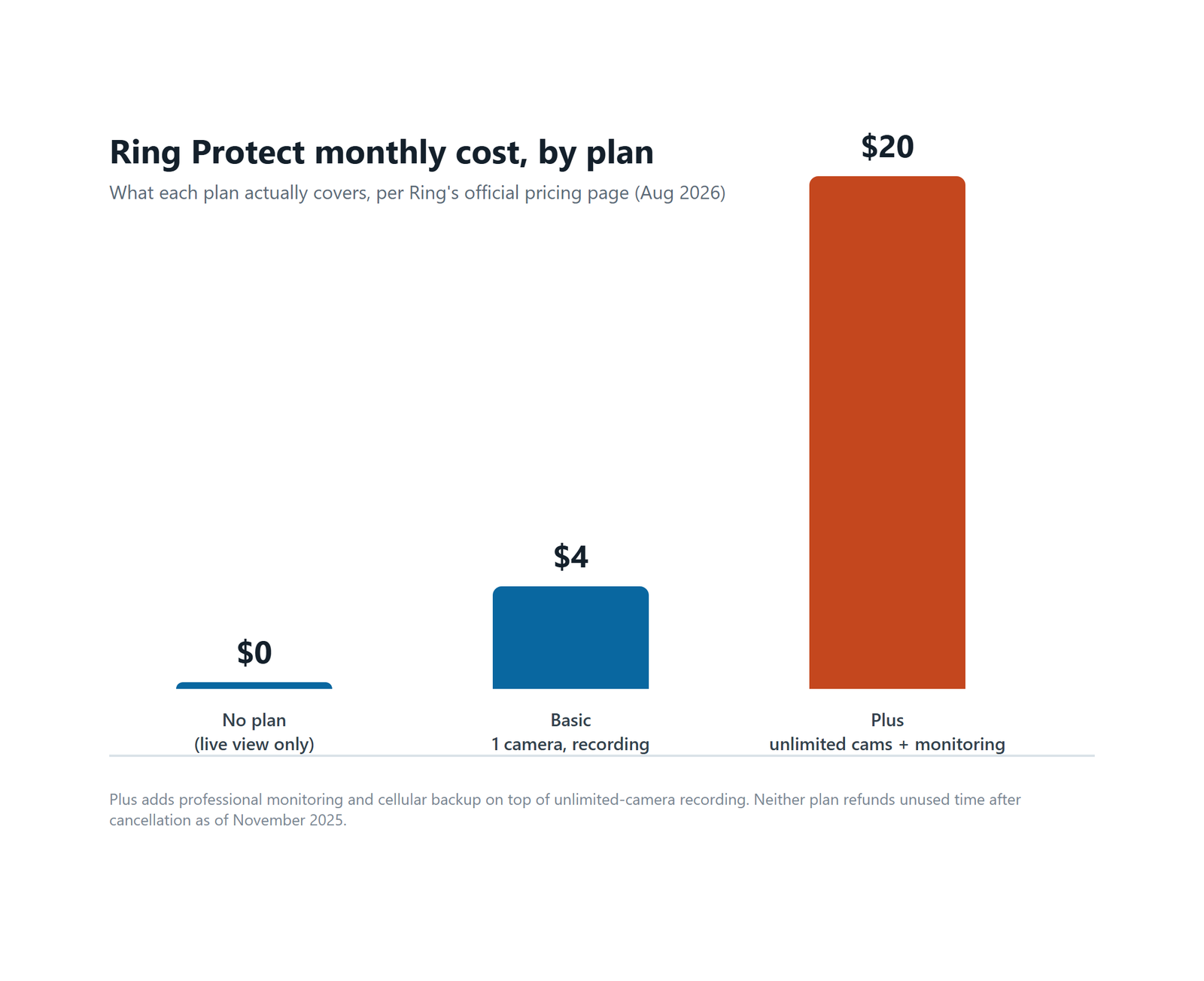
Ring Protect Basic runs $4 a month for one camera’s cloud recording, while Plus is $20 a month and covers unlimited cameras plus professional monitoring and cellular backup, according to Ring’s current pricing page as of August 2026.
| Plan | Monthly | Annual | Cameras Covered | Pro Monitoring | Cellular Backup |
|---|---|---|---|---|---|
| No plan | $0 | $0 | 0 | No | No |
| Basic | $4 | $40 | 1 | No | No |
| Plus | $20 | $200 | Unlimited | Yes | Yes |
If you’re deciding whether to downgrade instead of fully canceling, Basic keeps recordings for a single camera at a fraction of Plus’s cost — but you’d still be giving up professional monitoring and cellular backup either way.
The Billing-Cycle Detail Ring Doesn’t Spell Out
Canceling doesn’t touch a charge that’s already gone through. If your plan renews on the 3rd and you cancel on the 4th, you’ve just paid for a full new cycle you get zero days back on under the current policy.
Cancel a day too late and you’ve effectively paid for a month of nothing.
Your renewal date is visible under Plan Information in the app or on ring.com. If you’re canceling anyway, timing it a few days before that date — not after — is the only way left to avoid paying for a cycle you won’t use.
Is There Still a Way to Get Your Money Back?
If Ring won’t refund you directly, a card-issuer billing dispute is still a legitimate path, but only within 60 days of the statement showing the charge, under the Fair Credit Billing Act as summarized in the FTC’s current consumer guidance.
To use it: contact your card issuer’s billing-dispute department (not the payments address), explain the charge in writing, and attach your cancellation confirmation email and the renewal date if it supports your case — for example, if the charge hit after you’d already canceled, or renewed without the notice you expected. The issuer has to acknowledge the dispute within 30 days and resolve it within 90. It’s not guaranteed, but a documented paper trail is what makes or breaks these.
If you paid through PayPal rather than a card directly, PayPal’s own buyer protection process is a separate, sometimes faster option worth trying first.
Before You Cancel, Do These Three Things
- ✅ Check your renewal date under Plan Information first, and cancel a few days before it — not after.
- ✅ Download any footage you actually want to keep. It disappears with the plan, not with the app itself.
- ✅ If you manage more than one property or device group, cancel each plan individually — ending one doesn’t touch the others.
Honestly, that’s usually enough to avoid the two most common regrets people report after canceling.
What to Watch Out For After You Cancel
If cellular backup matters to you during Wi-Fi or power outages, canceling Plus or an Alarm plan removes it completely — self-monitoring through the app becomes your only safety net from that point on.
When I checked recent Ring community forum threads, several annual-plan subscribers who canceled expecting a prorated refund said they were told the new no-refund policy applied even though they’d originally signed up months before the change took effect. Don’t assume your sign-up date protects you — the cancellation date is what Ring goes by now.
FAQ
Does canceling Ring Protect delete my account too?
No. Canceling only removes the subscription — your Ring account, devices, and app settings stay active. You can add a plan back at any time without re-registering your hardware.
Can I cancel just one camera’s plan and keep others?
Yes, if each camera runs its own individual Basic plan rather than a shared Plus plan. Plus covers every camera on the account at once, so canceling it removes coverage everywhere; individual Basic plans can be canceled one at a time.
Will my Ring doorbell still work at all without a plan?
Yes. Live view, motion notifications, and two-way talk keep working with no plan active. What you lose is cloud video storage, professional monitoring, and cellular backup — the hardware itself isn’t disabled.
Sources
- Ring Support — Canceling Your Ring Plan
- Ring — Protect Plans & Pricing
- FTC Consumer Advice — Using Credit Cards and Disputing Charges
Not financial or legal advice. Pricing, policy dates, and dispute timelines above reflect publicly available Ring and FTC guidance at time of writing and may change — verify current terms with Ring and your card issuer before acting.