How to Cancel Your Noom Subscription and Actually Get
Noom keeps charging some people for weeks after they think they already left. The subscription lives in a system separate from the coaching app itself, and that separation is exactly where the confusion starts. Three legitimate cancellation paths exist, and which one applies to you depends entirely on where the original charge came from.
📌 Related reading: if you’ve fought this exact runaround before, see How to Cancel Your Adobe Subscription Without the Cancellation Fee.
Jump to a Section
- How Do You Cancel a Noom Subscription?
- Will You Actually Get a Refund From Noom?
- How Do the Three Cancellation Methods Compare?
- Why Did Noom Still Charge Me After I Deleted the App?
- What Should You Check Before You Cancel?
- Tips
- Warnings
- FAQ
- Sources
How Do You Cancel a Noom Subscription?
Noom subscriptions cancel through one of three places, and the right one depends on where your first charge came from: Noom directly, the Apple App Store, or Google Play.
Method A: Cancel Through the Subscription Portal
Sign in to Noom’s Subscription Portal using the email address tied to your account. The portal sits separately from the coaching app itself, which is the part that trips people up most. Once you’re signed in, the main page shows a Cancel Subscription button. Click it and follow the on-screen confirmation, and note the confirmation number it gives you.
Method B: Cancel Inside the Noom App
Open the app and tap your profile picture in the top-left corner. Tap Settings, then Manage Subscription. The app walks you through the same cancellation flow as the web portal, just inside a smaller screen. Either method reaches the same backend, so you only need to do one, not both.
Method C: Cancel Through the App Store or Google Play
If Apple or Google billed you instead of Noom directly, cancel through that store. Noom’s own portal can’t reach into that billing relationship. On iPhone, open Settings, tap your name, then Subscriptions, and select Noom, following Apple’s own cancellation steps. On Android, open the Play Store, tap your profile icon, go to Payments & subscriptions, and select Noom, per Google Play’s subscription help page.
This three-way split isn’t an accident. Regulators have been pushing subscription apps toward easier self-service cancellation for a while now. The FTC’s guidance on negative-option subscriptions is part of why a plain cancel button exists at all, instead of a phone-only retention line you have to argue your way through.
Will You Actually Get a Refund From Noom?
A Noom refund depends on which program billed you and how many days have passed since that charge, not on how you feel about the app afterward.
For Noom Weight, the standard plan, a refund is available if you ask within 14 days of your first charge. Miss that window and the charge is final, even for a renewal you simply forgot to cancel in time. Noom Med works differently: a refund stays possible until a prescription is actually written for you, after which it’s off the table no matter how many days have passed. Telehealth visits for branded medications follow a tighter 7-day rule, and that window closes the moment a clinical visit happens, not just when a doctor is assigned to your case.
This part trips a lot of people up.
Canceling and refunding are two separate actions. Canceling stops future billing. It does nothing to the charge that already posted. If you want that specific charge back, you have to ask for it directly, and Noom’s refund policy routes that request through support@noom.com, with your account email and the exact charge date attached. If you’re also tracking what’s actually in your supplement stack while you diet, our guide to reading a supplement label covers the numbers worth double-checking there too.
How Do the Three Cancellation Methods Compare?
The Subscription Portal is the fastest option for most people, while an app-store cancellation takes an extra step but is the only route available if Apple or Google originally billed you.
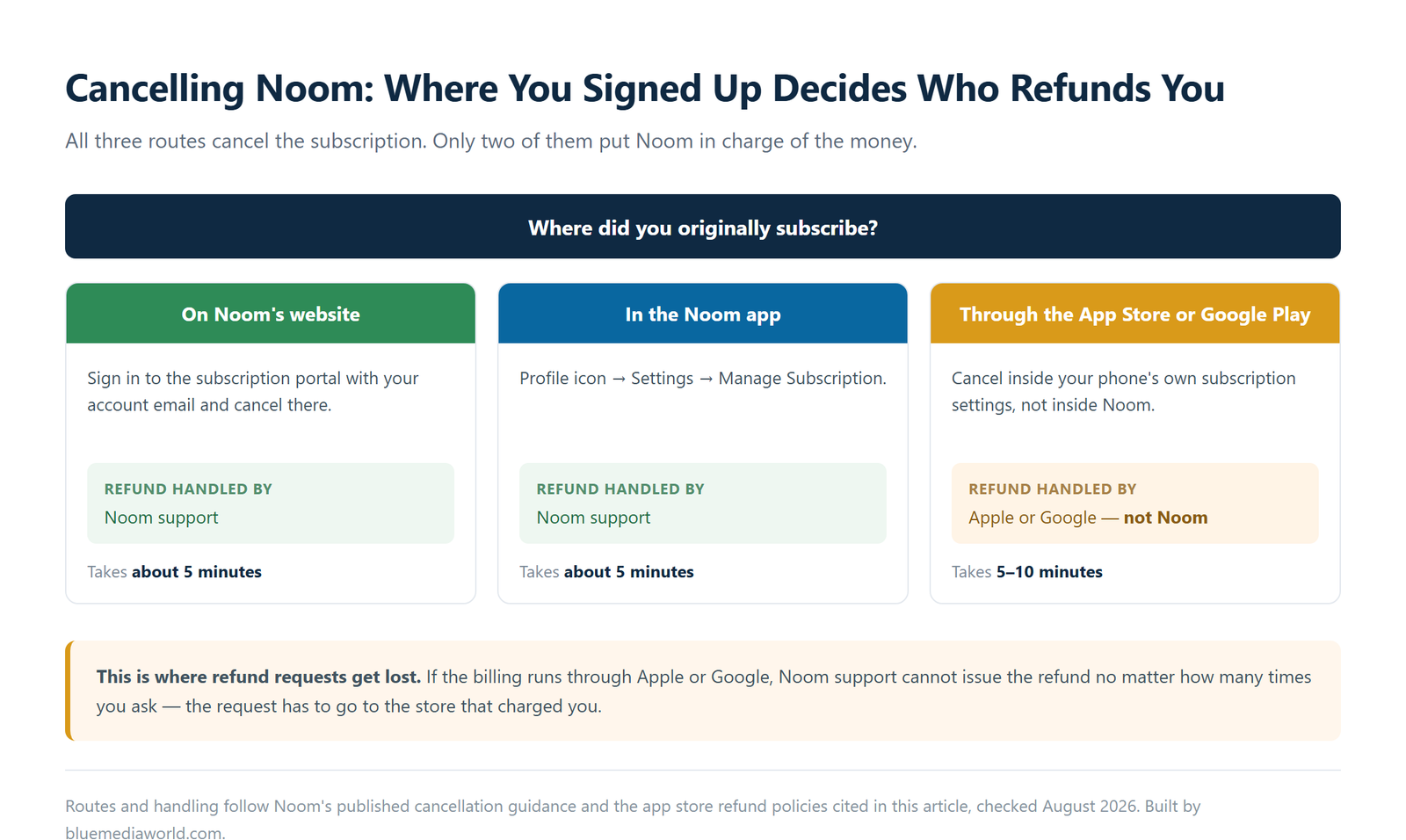
| Method | Where You Start | Refund Handled By | Typical Time |
|---|---|---|---|
| Subscription Portal | Noom’s web portal, signed in with your account email | Noom support | About 5 minutes |
| Noom App | Profile icon then Settings then Manage Subscription | Noom support | About 5 minutes |
| App Store / Google Play | Your phone’s own subscription settings | Apple or Google, not Noom | 5-10 minutes |
Why Did Noom Still Charge Me After I Deleted the App?
Deleting the Noom app removes it from your phone, not from your subscription. Noom keeps billing on schedule until you cancel through one of the three methods above.
When I checked Noom’s own support documentation, the same warning showed up in two separate places, worded almost identically both times: uninstalling does not cancel anything, and canceling itself doesn’t refund the cycle you’re currently in unless you’re inside the refund window described above. That repetition is a signal. Enough people have been burned by it that Noom apparently felt the need to say it twice.
Your subscription is tied to your account and your payment method, not to whether the app icon is sitting on your home screen. The billing system runs on its own schedule whether or not you ever open the app again.
What Should You Check Before You Cancel?
Three details decide how smoothly this goes: who actually billed you, how many days have passed since that charge, and which Noom program you’re on.
When I looked at how Noom’s charges actually appear on a statement, I found that the wording differs enough between billing paths that misreading it is an easy way to spend ten minutes canceling the wrong thing entirely.
- ✅ Pull up your bank or card statement and find the exact line item. “Noom,” “Apple.com/bill,” and “Google *Noom” each point to a different cancellation method.
- ✅ Note the date of your most recent charge. That date is what your 14-day, or 7-day, refund window counts from.
- ✅ Confirm which program you’re on, Weight, Med, or a telehealth plan, since each carries a different refund rule.
- ✅ Have your account email ready. Both the portal and a refund request need it to find your account.
- ✅ On a free trial? Check the exact end date and cancel at least a day early rather than on the last day.
What Small Moves Make This Easier?
- ✅ Cancel a couple of days before your renewal date rather than right after it. You keep the access you already paid for either way, and it avoids a same-day support queue.
- ✅ Screenshot the cancellation confirmation screen, and save any confirmation email Noom sends you.
- ✅ A refund request by email works better when the account email and exact charge date are in the first message, not a follow-up.
- ✅ Check your statement descriptor before disputing anything with your bank. A chargeback on an Apple or Google charge won’t touch your Noom account at all.
What Mistakes Cost People Their Refund?
- ⚠️ Renewal charges on Noom Weight aren’t refundable once the 14-day window closes, even if you cancel that same day.
- ⚠️ Once a prescription is written under Noom Med, that charge is no longer refundable. Cancel before that step if you’re still deciding.
- ⚠️ Uninstalling the app does nothing to your billing. You’ll keep getting charged until you cancel through the portal, the app’s settings, or your app store.
- ⚠️ Cancellations made through Apple or Google follow their refund rules, not Noom’s. Noom support genuinely can’t issue that refund even when they want to help.
- ⚠️ Give a support request one to two business days before following up. The in-app chat can make it feel instant even though it isn’t.
FAQ
Does uninstalling the Noom app cancel my subscription?
No. Removing the app from your phone only deletes the app itself. Noom keeps billing on schedule until you cancel through the Subscription Portal, the app’s Settings menu, or your app store, whichever one originally billed you.
How long does a Noom refund take once it’s approved?
Noom doesn’t publish an exact turnaround time, but approved refunds to a bank or card typically post within 5-10 business days. Follow up with support@noom.com if nothing has shown up after two weeks.
Can you cancel a Noom free trial before it charges you?
Yes. Cancel through the Subscription Portal or the app’s Settings menu before the trial period ends, and Noom won’t charge the card on file. Waiting until the trial’s last day is risky, since processing can lag by a few hours and tip you into the charge anyway.
Sources
- Noom: How to Cancel Your Noom Subscription or Trial
- Noom: Noom Refund Policy
- FTC Consumer Advice: Getting Out of Free Trials, Auto-Renewals, and Negative Option Subscriptions
Fact-checked based on public sources as of August 5, 2026. This article covers cancellation and refund steps only. It isn’t medical, dietary, or financial advice about the Noom program itself.