How to Cancel Chewy Autoship and Actually Get Your Refund
Chewy doesn’t have one master switch for Autoship. Every item you’ve set up — the food, the litter, the chew treats — runs on its own schedule with its own cancel button, and that per-item design is exactly where most people get stuck trying to shut the whole thing down at once.
📌 Related reading: if your Autoship food order keeps arriving on autopilot, our comparison of wet vs dry dog food for senior dogs is worth checking before your next shipment locks in.
Jump to a Section
- How Do You Cancel a Chewy Autoship Item Before It Ships?
- What Happens If Your Autoship Order Already Shipped?
- Should You Pause an Item Instead of Canceling It?
- How Long Do You Actually Have Before the Deadline Closes?
- Why Does Chewy Cancel by Item Instead of by Account?
- What Should You Check Before You Cancel?
- What Mistakes Cost People Their Refund?
- FAQ
- Sources
How Do You Cancel a Chewy Autoship Item Before It Ships?
You cancel a Chewy Autoship item from the Autoship Manager inside Your Account, and the whole process takes about two minutes once you’re signed in.
Step 1: Open Autoship Manager From Your Account Page
Sign in at chewy.com and go to Your Account, then Manage Autoship. Every active item shows up here with its own next-ship date, not bundled into a single account-level list the way a lot of people expect.
Step 2: Select the Item and Choose Cancel
Click into the specific product, then select Cancel Autoship next to it. If you have five items on five different schedules, canceling one doesn’t touch the other four — you’d repeat this step for each one you actually want to stop.
Step 3: Confirm and Save the Cancellation Email
Confirm the cancellation on-screen and keep the confirmation email that follows. That email is your proof if a charge slips through anyway, which happens more often right at the edge of the deadline window than most people expect.
Prefer a person on the phone? Chewy’s customer service line at 800-672-4399, listed on the company’s own Autoship Terms page, handles the same cancellation and is staffed around the clock.
What Happens If Your Autoship Order Already Shipped?
A Chewy Autoship order that already shipped can’t be canceled — at that point you’re working with Chewy’s return policy instead, which the company advertises as a 365-day return window from the original purchase date.
That distinction matters more than it sounds.
Cancellation stops a charge from happening. A return reverses one that already did, and it runs through a different process entirely. When I checked Chewy’s return policy alongside Autoship’s own terms page, I found that missing the cancellation window doesn’t disqualify you from a return — it just moves you into a slower lane.
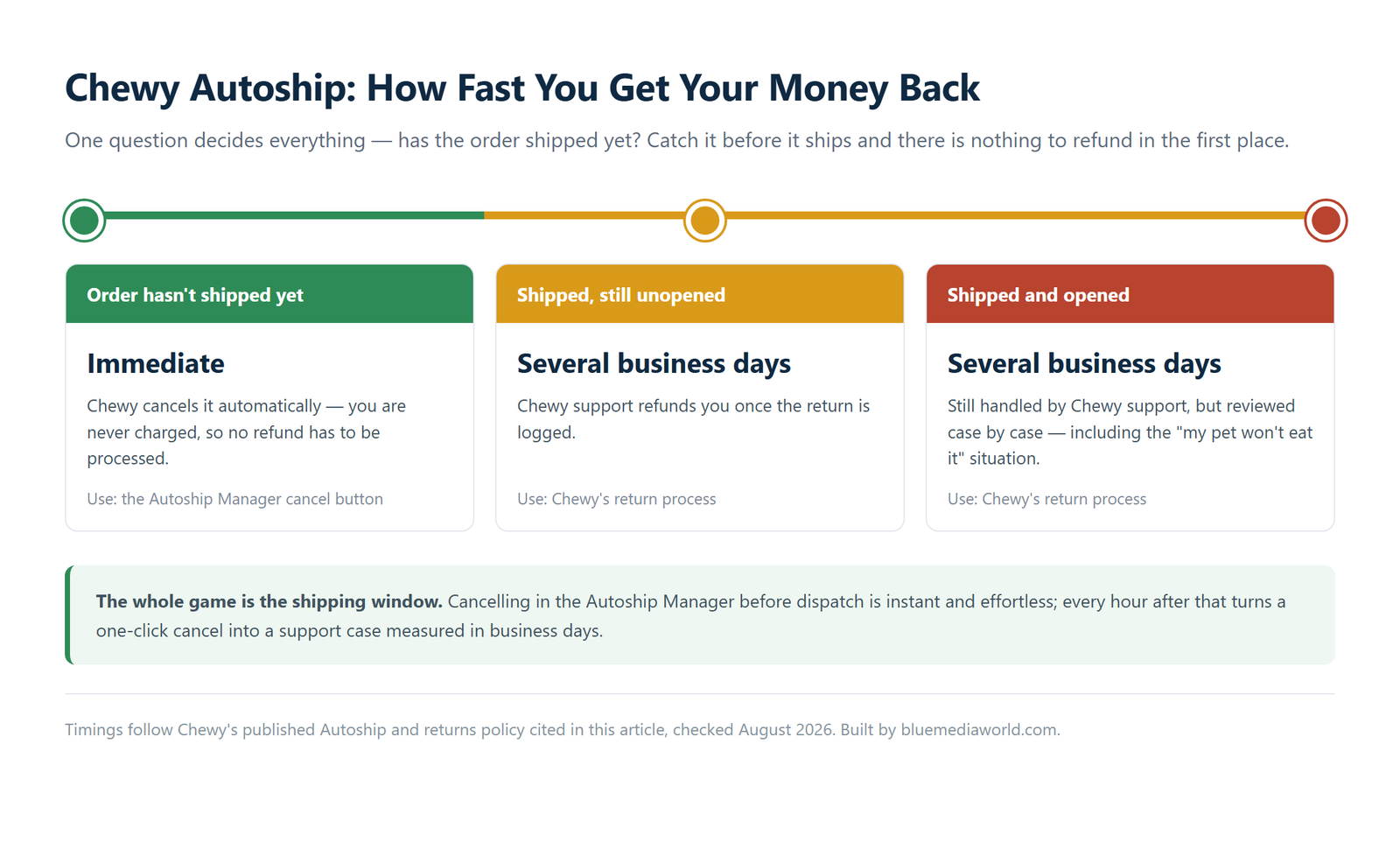
| Situation | What You Use | Who Refunds You | Typical Speed |
|---|---|---|---|
| Order hasn’t shipped yet | Autoship Manager cancel button | Chewy, automatically — nothing to charge | Immediate |
| Order shipped, still unopened | Chewy’s return process | Chewy support, after the return is logged | Several business days |
| Order shipped, opened or pet won’t eat it | Chewy’s return process, case by case | Chewy support | Several business days |

Should You Pause an Item Instead of Canceling It?
Pausing a Chewy Autoship item keeps your schedule intact while skipping the next delivery, and it’s usually the better call if you just need a break rather than a permanent stop.
This matters more in a small apartment than most guides bother mentioning. A 30-pound bag of kibble that shows up while you’ve still got two-thirds of the last one left doesn’t have anywhere to go — no garage, no extra pantry, often not even a closet shelf that fits it. Pausing the next shipment for a cycle or two solves that without losing your place in Autoship & Save pricing the way a full cancel-and-resubscribe might.
Reading through owner threads about paused-then-resumed Autoship items, I found that the recurring complaint wasn’t losing the discount outright — it was not getting a clear heads-up before the new price applied.
Skip or delay a shipment right from the same Autoship Manager screen where you’d cancel. The option to push the next date back a week or two sits next to the cancel link, not buried somewhere else.
How Long Do You Actually Have Before the Deadline Closes?
Your cancellation window opens when Chewy sends the pre-shipment email, roughly 72 hours before the scheduled ship date, and it closes at 12:00 AM the day before that date.
Once that midnight cutoff passes, the order is authorized for shipping and the cancel button in Autoship Manager stops working for that cycle, even if the package hasn’t physically left a warehouse yet. Set a calendar reminder for the day the pre-shipment email lands rather than the ship date itself. Waiting until you see the ship date on your calendar usually means you’re already past the point where canceling still works.
Why Does Chewy Cancel by Item Instead of by Account?
Chewy runs Autoship as a collection of independent product subscriptions rather than one account-wide plan, so each item keeps its own ship date, discount, and cancel button.
It’s a reasonable design once you see why.
Someone with three pets buying five different products rarely wants all of it to stop or restart on the same day — the litter runs out on a different schedule than the food, and the food runs out on a different schedule than a monthly flea treatment. The tradeoff is that canceling Autoship isn’t a single action. It’s one action, repeated per item, until nothing’s left running.
What Should You Check Before You Cancel?
A few Chewy Autoship details decide how smoothly a cancellation goes, and checking them first avoids a second trip back into your account.
- ✅ Open Autoship Manager and note each item’s exact next-ship date — they’re rarely all the same.
- ✅ Compare that date against today’s date. If you’re inside the 72-hour pre-shipment window, move fast.
- ✅ Decide per item whether you want a full cancel or just a skip. You don’t have to choose the same option for everything.
- ✅ Screenshot the cancellation confirmation screen before you close the tab.
- ✅ If an order already shipped, start the return process right away instead of waiting to see if it sorts itself out.
What Mistakes Cost People Their Refund?
These mistakes are what typically cost Chewy Autoship customers a refund or a discount they expected to keep.
- ⚠️ Canceling one item and assuming the rest of your Autoship items stopped too. They didn’t — each one needs its own cancellation.
- ⚠️ Waiting until the ship date itself to act. The real deadline is midnight the night before, which catches people off guard.
- ⚠️ Assuming a shipped order simply can’t be fixed. It can, through a return rather than a cancellation, and Chewy’s return window runs a generous 365 days.
- ⚠️ Restarting a paused item without checking the price shown first. Chewy doesn’t guarantee an identical Autoship & Save discount carries over automatically.
- ⚠️ Disputing a Chewy charge with your bank before contacting Chewy support directly. A chargeback can lock your account while support could have resolved it in minutes.
FAQ
Can you cancel Chewy Autoship after the order has already been charged?
No, not as a cancellation. Once an order is authorized and charged, you’re working with Chewy’s return process instead, which the company advertises as a 365-day window from purchase.
Does pausing a Chewy Autoship item cost you the discount?
Not automatically, but Chewy doesn’t guarantee the exact price stays fixed while an item sits paused. Check the price shown on the item before you confirm the next shipment.
Do you have to cancel every Autoship item separately?
Yes. Chewy manages Autoship per product, not as one account-wide subscription, so canceling one item leaves every other active item running on its own schedule.
Sources
- Chewy: Autoship Terms
- Chewy: Return Policy
- FTC Consumer Advice: Getting In and Out of Free Trials, Auto-Renewals, and Negative Option Subscriptions
Fact-checked based on public sources as of August 6, 2026. This article covers cancellation and return steps only — it isn’t legal or financial advice, and prices, deadlines, and policy details can change after publication.