
ChatGPT Plus 5-Hour Usage Cap Is Back
Quick answer: OpenAI turned the rolling five-hour Codex and ChatGPT Work cap back on for Plus subscribers on August 25, 2026. It runs alongside the separate weekly quota, not instead of it. ChatGPT Pro at $100 and $200 stays exempt for the next few months. If you hit the wall mid-project, spacing heavy sessions across different five-hour windows works better than buying extra credits on the spot.
Plus subscribers running Codex or ChatGPT Work sessions this week probably ran into a familiar wall — a rolling five-hour limit that had quietly disappeared for a few weeks in July came back without much warning on August 25, 2026.
People who got used to working uninterrupted are now hitting a stop mid-task again, and the confusion isn’t really about the limit itself — it’s about how it stacks with the weekly cap, which plans still have it, and whether there’s an actual workaround short of paying for Pro.
Skip to What You Need
- Why Did OpenAI Bring Back the 5-Hour Cap?
- How Does the 5-Hour Window Stack With the Weekly Cap?
- How Can You Avoid Hitting the Cap Mid-Session?
- Does Upgrading to ChatGPT Pro Actually Solve This?
- Plus vs Pro vs Team: Who Still Has the Limit?
Why Did OpenAI Bring Back the 5-Hour Cap?
OpenAI reinstated the rolling five-hour Codex and ChatGPT Work cap for Plus subscribers starting August 25, 2026, according to Codex technical lead Thibault Sottiaux’s August 24 announcement on X.
The stated reason is compute smoothing, not a punishment for heavy users. Plus accounts had been running against the weekly quota alone for a few weeks, and OpenAI’s own framing is that casual and newer users kept burning through an entire week’s allowance in one or two long sessions, then getting confused when everything locked up for days.
Honestly, that explanation lines up with the complaint pattern from July — fewer “I got capped instantly” posts, more “I have nothing left until next Tuesday” ones. The five-hour wall is meant to space that out into smaller, more predictable interruptions instead of one long one.
How Does the 5-Hour Window Stack With the Weekly Cap?
The five-hour limit doesn’t replace the weekly quota — it sits on top of it, so a Plus account now has to clear two separate ceilings instead of one.
In practice that means a rolling window resets roughly five hours after your first message in that window, while a second, larger bucket still tracks total usage for the week. Bump into the five-hour wall and you wait out that shorter window; bump into the weekly one and you’re stuck until the weekly reset, which is the outcome the reinstated cap is specifically trying to prevent.
When I checked OpenAI’s own help center article on using Codex with a ChatGPT plan, the language was explicit that this is a stacked system, not an either/or — hitting one limit doesn’t reset or forgive the other.
How Can You Avoid Hitting the Cap Mid-Session?
The most reliable fix is scheduling, not a settings toggle — starting your heaviest Codex or Work sessions at the start of a fresh five-hour window instead of the middle of one buys you the most uninterrupted runway.
Check your remaining window before you start something long
Run /status in the Codex CLI, or open the usage panel in Codex settings, before you commit to a task that’s going to run long. Starting a two-hour refactor with fifteen minutes left on your current window is how people get cut off mid-task.
Cut token-heavy habits that eat the window fast
Large file reads, verbose tool output, and repeatedly pasting long logs burn through a usage window faster than the actual reasoning does. Trimming what you paste in, or summarizing a log before feeding it to the model, stretches the same five hours noticeably further.
Switch to GPT-5-Codex-Mini when you’re close to the wall
Codex offers to switch you to GPT-5-Codex-Mini once you hit about 90% of your five-hour usage limit, which lets you keep working at reduced capability instead of stopping outright. It’s not a full workaround, but it’s a real bridge OpenAI built into the product specifically for this moment.
Bank a free reset if one’s available
OpenAI occasionally issues free resets, and banked resets from promotions or referral offers can also clear both the five-hour and weekly windows at once. Check the usage panel before assuming you’re stuck until the natural reset time.
Does Upgrading to ChatGPT Pro Actually Solve This?
Yes, for now — ChatGPT Pro at $100 and $200 a month stays exempt from the five-hour limit “for the upcoming months,” per Sottiaux’s own announcement, so upgrading does remove the wall rather than just raising it.
That’s a meaningfully different guarantee than a permanent exemption, though. The wording leaves room for Pro to get the same rolling cap later if usage patterns push OpenAI that direction again — it’s happened once already with the July removal and August reinstatement on Plus.
A cheaper move worth trying first, if you’re only occasionally hitting the wall: shift your heaviest sessions to right after a reset instead of paying $70–$170 more a month for a guarantee that’s explicitly temporary.
Plus vs Pro vs Team: Who Still Has the Limit?
Plan tier is the single biggest factor in whether you’ll see the five-hour wall at all — Standard-tier seats hit it, Premium-tier seats mostly don’t.
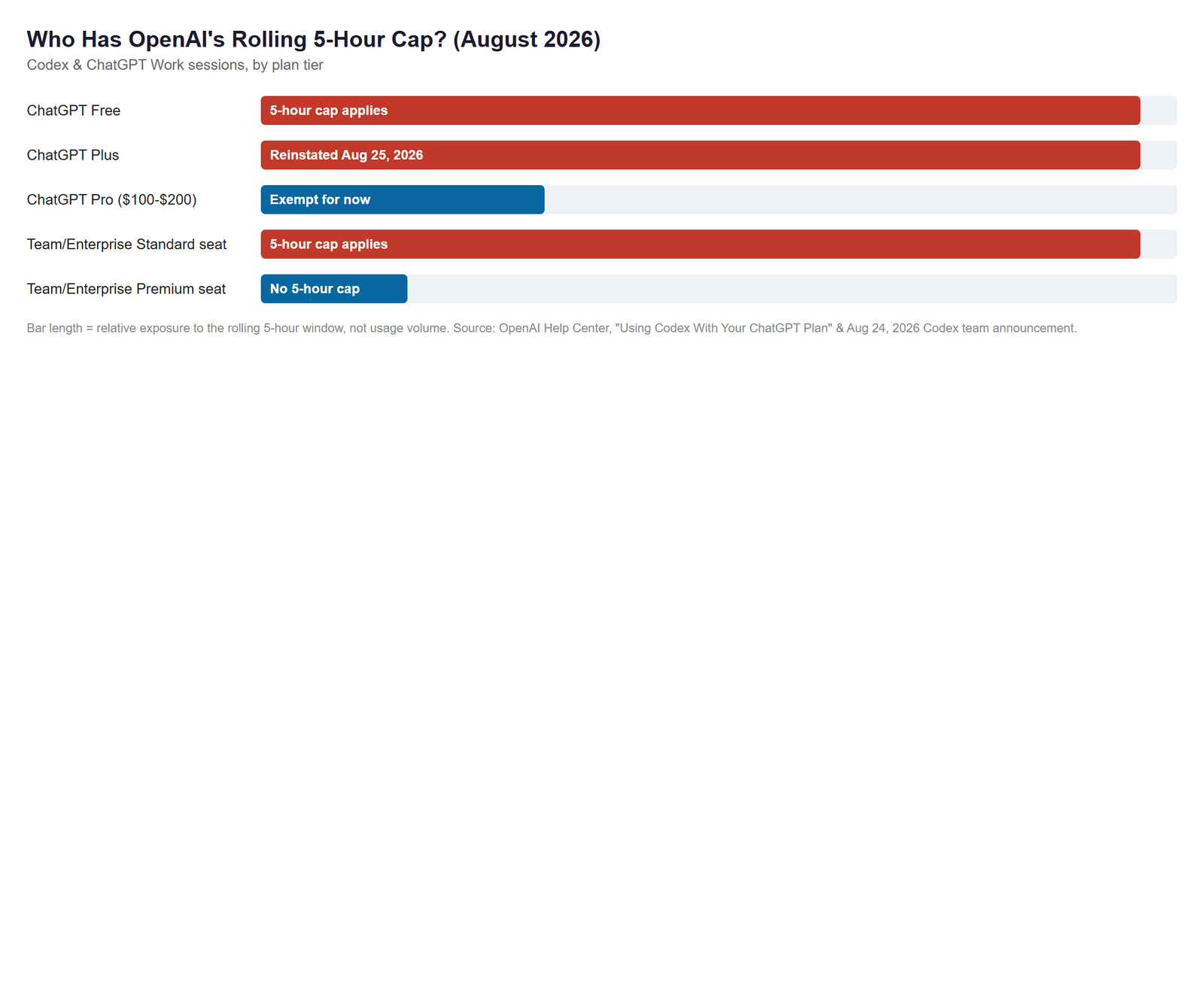
| Plan | 5-Hour Cap Status (Aug 2026) | Weekly Cap | Monthly Price |
|---|---|---|---|
| ChatGPT Free | Applies, tightest window | Applies | $0 |
| ChatGPT Plus | Reinstated Aug 25, 2026 | Applies | $20 |
| ChatGPT Pro | Exempt “for the upcoming months” | Effectively unlimited in practice | $100–$200 |
| Team / Enterprise (Standard seat) | Applies | Applies | Per-seat, org billing |
| Team / Enterprise (Premium seat) | Not subject to the 5-hour limit | ~5x Standard-seat usage | Per-seat, org billing |
As of August 2026, ChatGPT Team and Enterprise Premium seats include roughly five times the usage of Standard seats and carry no five-hour limit, according to OpenAI’s help center article on using Codex with a ChatGPT plan. If your team is on Standard seats and hitting the wall constantly, that Premium-seat difference is worth raising with whoever manages the org’s OpenAI billing before anyone reaches for a personal Pro subscription instead.
Reading OpenAI’s own release notes closely, I found that the five-hour limit had only been off for a few weeks in July before it came back — not the months some community threads implied, which matters if you’re deciding whether this is a permanent product direction or something still being tuned in real time.
Quick Moves Before Your Next Long Session
- ✅ Check
/statusor the usage panel before starting anything that’ll run over an hour. - ✅ Start heavy Codex work right after a window reset, not in the middle of one.
- ✅ Trim what you paste into the context — logs and full files cost more than typed prompts.
- ✅ Let Codex switch you to GPT-5-Codex-Mini near 90% instead of forcing a hard stop.
Where This Trips People Up
Don’t assume the weekly cap resets just because the five-hour window did — they’re tracked separately, and clearing one does nothing for the other unless you use a banked or promotional reset that explicitly covers both.
Don’t treat GPT-5.6’s new Ultrafast mode as a fix for this. It’s a limited API preview aimed at developers building on OpenAI’s platform, not a setting inside the ChatGPT consumer app, so it has no effect on a Plus subscriber’s five-hour or weekly windows today.
FAQ
Does the 5-hour cap apply to regular ChatGPT chat, or only Codex and Work?
The reinstated cap targets Codex and ChatGPT Work sessions specifically, not standard ChatGPT conversations — Plus users doing normal chat, image generation, or search haven’t reported the same rolling five-hour wall.
Will ChatGPT Team or Enterprise seats hit the same 5-hour wall?
Team and Enterprise Premium seats are built to skip it — Premium seats include roughly five times the usage of Standard seats, and OpenAI’s own plan documentation lists them as not subject to a five-hour usage limit.
Does GPT-5.6 Ultrafast mode help Plus users avoid the cap?
Not directly — Ultrafast is a limited API preview for developers, not a toggle inside the ChatGPT app, so it doesn’t change what a Plus subscriber’s usage window looks like today.
Sources
- OpenAI Help Center — Using Codex With Your ChatGPT Plan
- OpenAI — Previewing Ultrafast Mode for GPT-5.6
- OpenAI Help Center — ChatGPT Release Notes
Fact-checked based on 3 public sources as of August 27, 2026. OpenAI has changed this specific limit twice in three months, so check the release notes link above before assuming today’s rules still apply next quarter.
🔗 Related guides