iOS 27 Public Beta With the New Siri Is Here
Quick answer: The iOS 27 public beta has been open to everyone since July 13, 2026, and it ships the rebuilt Siri built on Apple’s new Foundation Models. Apple has pushed seven betas in six weeks but still hasn’t named a stable release date — commentators are guessing mid-September. Install now only if you have a spare iPhone or a high tolerance for bugs and battery drain. If your iPhone is the only one you have, wait.
Apple opened the iOS 27 public beta to anyone willing to install it on July 13, 2026, and the headline feature is a Siri that finally behaves like the AI assistant Apple promised back in 2024 — one that understands what’s on your screen, remembers what you told it last week, and can actually act on requests instead of just answering them.
The catch is timing. Beta software breaks things, and Apple hasn’t said exactly when the rough edges get sanded off into a stable release you’d feel comfortable running on your only phone.
What’s Actually New in the Rebuilt Siri?
Apple’s rebuilt Siri in iOS 27 runs on the new Apple Foundation Models under the “Apple Intelligence” umbrella, combining personal context, onscreen awareness, and live web knowledge into one assistant that’s supposed to hold an actual conversation instead of a string of disconnected commands.
That means Siri can now look at what’s open on your screen and answer questions about it directly, pull in details from your messages or calendar without you spelling them out, and carry a chat history across your iPhone, iPad, and Mac so a conversation you started at your desk can continue on your phone later. Apple is also framing it as more capable of taking actions inside apps rather than just returning search results — booking, filling in, or completing a task instead of pointing you toward an app to do it yourself.
When I checked TechCrunch’s coverage of the July 13 rollout against Apple’s own beta release notes, the framing lined up on one point worth repeating: this isn’t a small assistant patch. It’s the first time Apple has opened the rebuilt Siri to the general public rather than developers only, which is why the beta downloads spiked the way they did in mid-July.
How Far Along Is the Beta, and When Does the Stable Release Land?
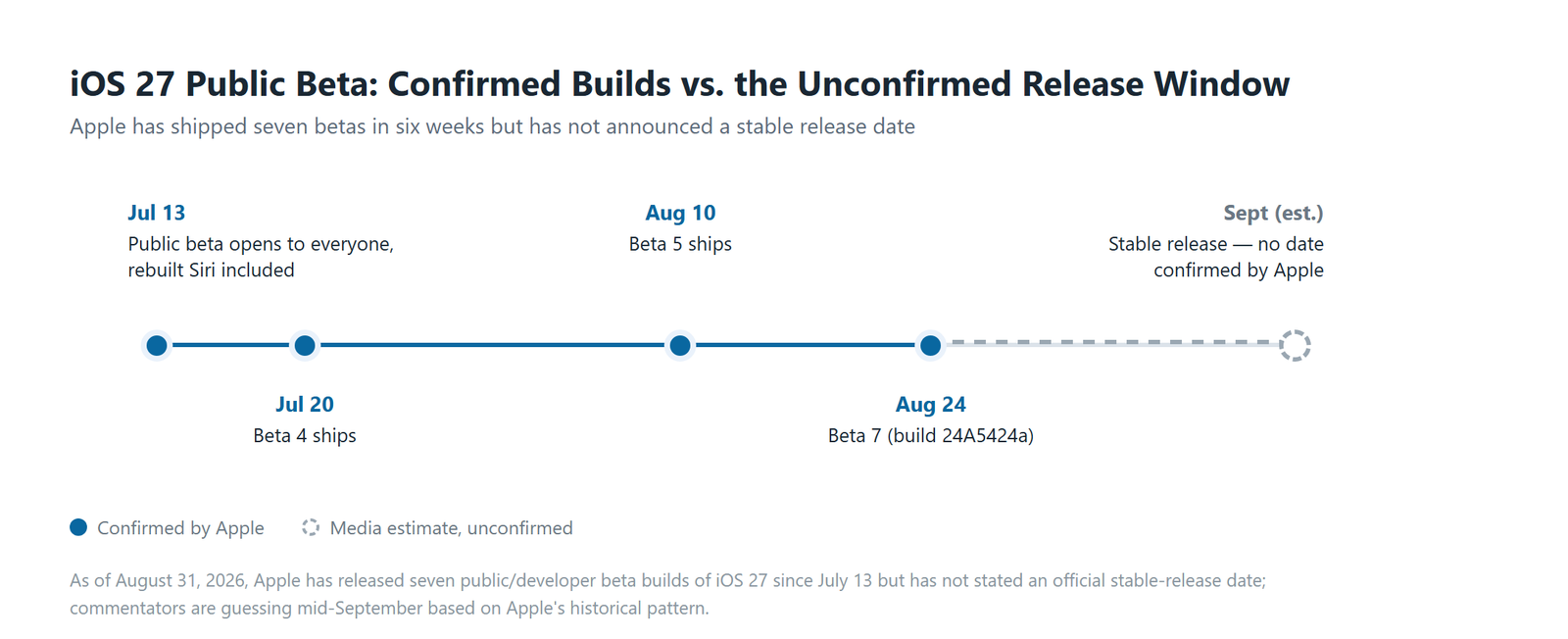
As of August 31, 2026, Apple has shipped seven developer and public beta builds of iOS 27 since opening the public beta to everyone on July 13, with beta 7 — build 24A5424a — landing on August 24, but the company still hasn’t named an official date for the stable release.
Beta 4 shipped July 20. Beta 5 followed August 10. Then came a run of near-weekly builds through beta 7 in late August, which is a fast cadence for this point in the cycle. Fast betas usually mean Apple is getting close, not that anything is finished.
Here’s where people get ahead of the facts. Multiple outlets, Macworld among them, are guessing at a mid-September stable release window because that’s roughly when Apple has shipped the final iOS version in past years. That’s a pattern-based guess, not a confirmed date from Apple. Treat any specific release date you see online as unofficial until Apple says otherwise.
What Are the Real Risks of Running a Beta on Your Main iPhone?
Installing a beta on the phone you use every day carries three costs that show up in roughly this order: shorter battery life between charges, apps that crash or behave oddly until their developers ship compatible updates, and bugs Apple hasn’t caught yet because the software hasn’t finished testing.
Battery drain is the most consistent complaint in early betas — background indexing, new AI features re-processing your data, and unoptimized code all draw more power than the shipping version will. It usually improves build over build, but it rarely disappears completely until the stable release.
App compatibility is the second-biggest headache. Banking apps, some work-related tools, and anything that leans on payment or security frameworks are the most likely to misbehave on a beta OS, since developers test against the stable release first and catch up to betas later.
Reading through beta discussion threads on Reddit and Apple’s own community forums, I found that complaints cluster hardest in the first couple of days after each new beta lands, then quiet down as people update their apps and Apple ships a follow-up build. That pattern has held across roughly every iOS beta cycle, not just this one.

Should You Install the Public Beta Now, or Wait?
If your iPhone is your only phone and you depend on it for work calls, mobile payments, or anything time-sensitive, the safer move is waiting for the stable release instead of running the beta on that device.
The decision really comes down to what you’re using the phone for and whether you have a fallback if something breaks mid-week. A spare iPhone changes the calculus completely — you get to try the new Siri with zero downside.
| Your Situation | Install Now? | Why |
|---|---|---|
| Only iPhone, used for work or payments | Wait | App crashes or battery issues on your only device cost you more than the early Siri access is worth |
| Spare or secondary iPhone available | Install now | Zero downside — test the new Siri without risking your daily driver |
| Developer or power user comfortable troubleshooting | Install now, on a backed-up device | You already know how to work around beta bugs and roll back if needed |
| Traveling, or relying on the phone for something specific in the next 2 weeks | Wait | Not the week to introduce an unknown bug into a phone you can’t afford to have misbehave |
| Curious but risk-averse | Wait for the stable release | Mid-September (unconfirmed) isn’t far off, and the new Siri will still be there |
Honestly, most people fall into that last row. The new Siri is a real upgrade, but it’s not going anywhere — installing three weeks early isn’t worth a crashed banking app.
How Do You Roll Back to iOS 26 If Something Breaks?
If a beta update breaks something you need, Apple lets you go back to iOS 26 by erasing the device and restoring from a backup made before you installed the beta — there’s no in-place downgrade button.
Back up before you touch anything
Make a full backup through Finder (or iTunes on older Macs) or iCloud before you install the beta in the first place. This step matters more than any other on this list — it’s the only thing that makes a clean rollback possible later.
Download the iOS 26 restore file
Get the official iOS 26 IPSW file for your exact iPhone model from Apple’s developer or software download pages. Using the wrong model’s file will fail the restore, so double-check against your device’s model number before downloading anything.
Restore through Finder or Apple Configurator
Connect your iPhone, put it into recovery mode, and choose “Restore” while holding Option (Mac) or Shift (Windows) so you can point Finder at the IPSW file you downloaded instead of letting it grab the latest version automatically.
Set the phone up from your pre-beta backup
Once iOS 26 is back on the device, restore from the backup you made in step one rather than setting up as new. This is the part people skip when they’re in a hurry, and it’s the difference between a clean rollback and losing data.
Do This Before You Tap Install
- ✅ Back up through Finder or iCloud first — always, no exceptions.
- ✅ Check that your banking and work apps have a recent update before you install.
- ✅ Install on a secondary device if you have one available.
- ✅ Wait a day or two after a new beta drops before installing — early adopters usually surface the worst bugs first.
Where iOS Betas Usually Bite
Don’t install a new beta build the night before something important — flights, work presentations, anything you can’t afford to troubleshoot at 6 a.m. Beta bugs have a habit of surfacing at the worst possible time.
Don’t assume every app on your phone has been tested against iOS 27 yet. Developers prioritize the stable release, and betas are often an afterthought until the release candidate stage.
Don’t confuse “Apple opened the public beta to everyone” with “Apple thinks this is done.” Public beta access widened in July specifically so Apple could gather more bug reports before launch — that’s testing, not a soft launch.
FAQ
Will installing the iOS 27 public beta delete my data?
No — installing the public beta over an existing iOS installation keeps your apps and data in place, but Apple still recommends backing up first because beta installs carry more risk of a failed update than a stable release does.
Does the new Siri work the same in the public beta as it will in the final release?
Not necessarily — Apple has changed Siri’s behavior across beta 4, beta 5, and beta 7, and further changes are likely before the stable release ships, so features you test today may look or respond differently by September.
Can you install the public beta if your iPhone doesn’t support Apple Intelligence?
You can install iOS 27 on any iPhone the update supports, but Apple has consistently limited its newest Apple Intelligence features — including the rebuilt Siri — to more recent iPhone models with enough on-device processing power, so check Apple’s official compatibility list before assuming your specific iPhone gets the full Siri rebuild.
Sources
- TechCrunch — Apple Opens Its New Siri AI to Everyone With the iOS 27 Public Beta
- 9to5Mac — iOS 27 Beta 4 Now Available
- 9to5Mac — iOS 27 Beta 7 Now Available
- Macworld — iOS 27 Guide: Features, Release Date, and Apple Intelligence
Fact-checked based on 4 public sources as of August 31, 2026. Apple has not confirmed a stable release date at the time of writing — check the sources above before assuming any specific date reported elsewhere is official.
🔗 Related guides